Power meters · Public discussion

PowerTap Issue: Lost Data

Started by DParker · · Last activity · 29 posts · 2,760 views

This thread is locked and is currently read-only.

Thread navigation

Jump through the discussion

Go to the original post, the replies on this page, or the latest preserved contribution.

Thread details

What we know about this thread

Original section
Power meters
Published
25 April 2006
Last activity
2 May 2006
Original author
DParker
Posts
29
Discussion status
Public discussion
Total views
2,760
Views / 30 days
0
Topics

The navigation and discussion metadata provide context. Posts remain in their original chronological order.

Showing posts 1–20 of 29
Posts remain in their original chronological order.

Text size
  1. I've been using a PT SL for a year now - despite having now sent various parts (CPUs or wheels) to Saris four times for repairs, I stick with it due to lack of alternatives. But today I have a new issue: After just receiving a wheel back from Saris (riding in the rain conked out the hub - grrr), I rode on the trainer this morning, and everything was fine - all data looked good while riding. But at work when I tried to upload the data, using Cycling Peaks, an entry showed for today's ride, but there was only "16 feet" of data and no time - in other words, all the data for the ride was lost except the starting time/date. I didn't clear the CPU after the ride, which I can prove because two prior rides were in the memory and looked fine.

    I checked the memory of the ride - using the interval memory function - and indeed all the intervals of the ride are without data, showing only dashes.

    I called Saris and surprisingly received no help. The Saris rep advised me to clear everything, replace the batteries, and try again. But I'm not convinced the CPU is showing anything like a weak/dead battery. The rep said she'd never heard of such a situation. And I'm wondering if there's any connection between the work Saris did on the wheel and my new problem.

    Anyone out there have any ideas?

    Much appreciated if you can help -

    DParker
  2. I assume you have a solid (non-blinking) hub transmission icon and that you have run through all of the CPU tests in Test Mode. I had a similar problem when I got a replacement CPU from Saris, but the problem cleared itself up. Try recording a couple of trainer rides and then clearing the CPU.

  3. Good to hear someone else has seen this before!

    When you say "clear the CPU" do you mean the simple "hold down mode and select for five seconds or so" or do you mean a hard reset, ie. removing the battery?

    I did have a solid transmission icon during my ride this morning. I haven't gone through the test mode functions yet.

    I wonder if the CPU got messed up somehow due to the last ride when the hub failed due to the rain...

    DParker

  4. DParker said:

    Good to hear someone else has seen this before! When you say "clear the CPU" do you mean the simple "hold down mode and select for five seconds or so" or do you mean a hard reset, ie. removing the battery?

    I'd try everything short of a powerful magnet.😄

    DParker said:

    I did have a solid transmission icon during my ride this morning. I haven't gone through the test mode functions yet. I wonder if the CPU got messed up somehow due to the last ride when the hub failed due to the rain...

    I don't know. I never had the problem again. I have a backup CPU and receiver so I would be able to isolate the problem if it happens again, but it hasn't. Don't you hate those non-recurring problems?

  5. All set, a new battery in the CPU, which effectively resets most of the data, did the trick.
    Thanks for your thoughts-
    DParker

  6. DParker said:

    All set, a new battery in the CPU, which effectively resets most of the data, did the trick.
    Thanks for your thoughts-
    DParker

    Just a side thought, you might want to change the battery(you dide) but also make sure you have the latest firmware, and then re-zero the torque. My power tap pro i got from my friend was working kinda speradically and the above seemed to fix everything.

  7. DParker said:

    I've been using a PT SL for a year now - despite having now sent various parts (CPUs or wheels) to Saris four times for repairs, I stick with it due to lack of alternatives. But today I have a new issue: After just receiving a wheel back from Saris (riding in the rain conked out the hub - grrr), I rode on the trainer this morning, and everything was fine - all data looked good while riding. But at work when I tried to upload the data, using Cycling Peaks, an entry showed for today's ride, but there was only "16 feet" of data and no time - in other words, all the data for the ride was lost except the starting time/date. I didn't clear the CPU after the ride, which I can prove because two prior rides were in the memory and looked fine.

    I checked the memory of the ride - using the interval memory function - and indeed all the intervals of the ride are without data, showing only dashes.

    I called Saris and surprisingly received no help. The Saris rep advised me to clear everything, replace the batteries, and try again. But I'm not convinced the CPU is showing anything like a weak/dead battery. The rep said she'd never heard of such a situation. And I'm wondering if there's any connection between the work Saris did on the wheel and my new problem.

    Anyone out there have any ideas?

    Much appreciated if you can help -

    DParker

    My opinion is that the data wasn't lost.

    It simply wasn't recorded. And one potential reason for that is that it seems that powertap has a little flaw.

    When you hook it to its socket, in can be hooked enough for displaying data fine, but not enough to record properly.

    Solution, make sure that the computer is very well hooked. Push until the click, but push even a bit more, or else some garbage data might be recorded while the data displayed is fine.

  8. SolarEnergy said:

    When you hook it to its socket, in can be hooked enough for displaying data fine, but not enough to record properly.

    Not sure I know how that could happen, but snapping the computer securely into the handlebar mount is a good idea for lots of reasons (e.g., so it doesn't come off on rough roads).😄

  9. RapDaddyo said:

    Not sure I know how that could happen, but snapping the computer securely into the handlebar mount is a good idea for lots of reasons (e.g., so it doesn't come off on rough roads).😄

    I don't see many other potential reasons for garbage data to be inputed in the unit, while the display works fine. IMO, the hub transmits the data fine, but if one of the connectors is just a bit loose (unit 99% spapped, instead of 100%), then the bytes (10001010) 'may' sometimes be wrongly interpreted by the onbike computer unit (1000101_).

    In computing, when data doesn't seem to transfer correctly from the peripheral to the cpu, always accuse the communication hardware first (such as 'cables' between cpu and printers for instance, or connectors at each end of a network cable in a LAN environment).

    Interferences? Hmmm maybe, but I'm not sure. Because they would probably occur between the hub itself, and the antena. And would probably affect the data displayed on the onbike cpu.

    I had the same issue as the OP yesterday. One 30m segment didn't get recorded (or was not imported into CyclingPeak). Plus 1 or 2 > 1000w plots (garbage, trust me!). The display was consistantly working fine. It was a trainer session, I kept my eyes on the display all the time.

    On other potential reasons would be that CyclingPeak has problems in reading/importing the file. But Andy Coggan seemed to have ruled that out.

  10. DParker,

    It did it again for me too, even though the unit was correctly clipped. So I am looking at something else now.

    I'll keep you posted.

  11. SolarEnergy said:

    DParker,

    It did it again for me too, even though the unit was correctly clipped. So I am looking at something else now.

    I'll keep you posted.

    I still vote for the hard CPU reset (pull the batteries and leave them out long enough to drain any residual power - 1 yr? Just kidding.).

  12. RapDaddyo said:

    I still vote for the hard CPU reset (pull the batteries and leave them out long enough to drain any residual power - 1 yr? Just kidding.).


    Yeah but...

    I just received this unit. It worked for few rides. I can't help but wondering :

    What has changed?

    It's not the few hundreds of kilo showing on the od.
    It's not the batteries, the OP says he changed them.
    It's not CyclingPeak, I can definitely ruled that out now.

    The only thing I can think of now, is that since I first installed the unit, some sweat accumulated on it, and maybe some found its way inside?

    Are they stupid enough to not having tested their product enough for sweat intrusions?

    I will definitely consider a hard reset RD. But before, I am willing to sacrifice few more datafiles, to better understand the circunstances under which the bug occurs.

    I am just comming out of a 5min test ride on trainer. Downloaded the file it was ok.

    Tomorrow, I'll try an other one recording ever 1sec. If the bug occurs again, I'll try recording using a longer interval to see if it can be related.

  13. SolarEnergy said:

    Yeah but...

    SE, you kill me. You could have done the hard reset in less time than you took to write your message.

  14. RapDaddyo said:

    SE, you kill me. You could have done the hard reset in less time than you took to write your message.

    :o 😄

    Seriously, I tried one hard reset. That changed the behaviour of the unit somehow, but not totally the way I'd wish.

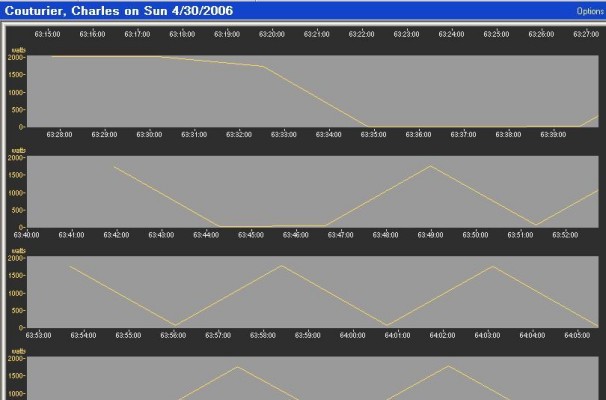
    Image in PowerTap Issue: Lost Data

    But thanks anyway. I'll try few more things and keep you posted.

  15. SolarEnergy said:


    Image in PowerTap Issue: Lost Data

    What a cool road.😎 Great for intervals.😄

  16. Yeah 😄

    And I control my power pretty well for a newbie.. Pretty linear 😄

    Seriously RD, I am on a good clue now.

    Let me ask you a question. In your opinion, should I be able to do multiple consecutive downloads of the same ride?

    I mean, not necessarly paste them all in cyclingpeaks, but at least, from the download window, I should be able to see the file unaltered no?

    Well, at the moment, I can't.

    My best hypothesis at the moment, is that for some mysterious reasons, the file is getting altered, either before, during or after the download.

    Here is what I did today.

    - Ride
    - Download in cp
    File was not so bad (except for the free games you saw earlier, which happened at the 63th hours??)
    - Closed cyclingpeaks, the damn app did not save the workout, and did not warn me about any unsaved data (go figure)
    - Tried to download it again... suprise, all garbage now, and only 5min of data
    - Open Poweragent by powertap. Download?? Same garbage
    - Tried an other cyclingpeak download.
    Each new download attempt, resulted into different garbage file.

    A normal human being with two legs, two arms, and a brain (instead of an empty coconut) would not program a file download by altering the file in anyway. You read you read. You don't write while reading.

    So my best hypothesis at the moment, is that under Windows XP Pro, when using the com port driver supplied by powertap (installation CD), setup for communicating through com3, some garbage get sent to the poor onbike computer.

    I'll have a tech installing me a win98 virtual machine on my laptop tomorrow. The bug may dissapear.

  17. SolarEnergy said:

    should I be able to do multiple consecutive downloads of the same ride? I mean, not necessarly paste them all in cyclingpeaks, but at least, from the download window, I should be able to see the file unaltered no? Well, at the moment, I can't.

    You should be able to download a ride as many times as you want until you do a data clear. The behavior of your CPU is so weird that I think you should consider getting a replacement CPU from Saris. I have never experienced anything remotely close to what you are experiencing and I have used a total of 4 different CPUs (2 were replaced because the HR receiver went on the blink and I own a backup CPU).

  18. Thanks RD !

    RapDaddyo said:

    You should be able to download a ride as many times as you want until you do a data clear.

    Have you ever tried it? Is it your sense for logic that speaks, or actual experience doing it?

    RapDaddyo said:

    The behavior of your CPU is so weird

    As I said earlier, the only thing that has actually changed, is the sweat that I put on the unit during indoor 120m tempo sessions. Talking about a lot of sweat here.

    RapDaddyo said:

    that I think you should consider getting a replacement CPU from Saris.

    Yeah but I need to try download on Win98 first, or at least using different com port drivers

    RapDaddyo said:

    I have never experienced anything remotely close to what you are experiencing and I have used a total of 4 different CPUs (2 were replaced because the HR receiver went on the blink and I own a backup CPU).

    Do you sweat a lot on them? In other words, do you do a lot of indoor training sweating on it?

  19. SolarEnergy said:

    Have you ever tried it? Is it your sense for logic that speaks, or actual experience doing it?

    I try it (accidentally) every time I fail to clear the CPU before a ride. And, once I failed to save the ride file before exiting CP and had to download the ride again. So, yes, I've tried it.

    SolarEnergy said:

    Do you sweat a lot on them? In other words, do you do a lot of indoor training sweating on it?

    No, my CPU is on my horizontal bar and is out of harm's way. But, in general moisture is not a good mix with electrical contacts.

  20. SolarEnergy said:


    - Closed cyclingpeaks, the damn app did not save the workout, and did not warn me about any unsaved data (go figure)

    Actually, it did - just not in the typically obvious manner. 😉

    CyclingPeaks was conceived with the notion that it would become the vehicle for sharing powermeter files via a common format (i.e., .wko). For this reason, any file you open isn't written to your hard drive unless and until you assign it to an Athlete you've created. Once you do, the file date will appear under that Athlete's name on the Navigation Bar, instead of under "Home". Moreover, if you make any changes in the file an asterisk (*) will be shown by the file date until you save the changes.

    Re. your downloading problems: I'm a bit rusty w/ respect to using my PowerTap, but the original version would indeed only allow you to download a file once (using Saris' software). The only way around a botched download or lost file was therefore to do a complete dump of the memory, using either ptapdll.exe or David Easter's recovery utility.

Active in the last 60 minutes

Active in this thread

0 users · 0 guests ·0 bots ·0 total

No signed-in users are active right now.

No known search crawlers active right now.